Frequently Asked Questions
What is a sugarlump?
When you love who you are and use your creativity for kindness, your 💖 sparkles ✨ with love and joy. That feeling is a sugarlump. It scatters like ☀️ until everyone is covered in kindness.
Who is involved?
Kids/families Grades K-6 elementary age to participate in character, confidence and positive development through creative acts of kindness, sharing, and experience self-worth and the joy in the power of giving.
Local elementary schools help introduce sugarlump’s character/confidence building programs as the primary source of kids to participate. Sugarlump donates a portion of the total funds raised from sponsors to each school that participates based on total number of classrooms in their school involved in the sugarlump program. Participation of the classroom requires only the introduction of the sugarlump “Kindness Programs” opportunity to their students, who intern share with their parents.
Local businesses, city, fire, police departments, pretty much anyone in the local chamber of commerce to sponsor and support sugarlump’s “Kindness Programs” by posting sponsorship provided signs and engagement stickers for the kids to seek in their treasure hunt throughout town, scan for their secret “Kindness Mission”. When the mission is completed the kid and their family return to the business to redeem their certificate of accomplishment and photo or video proof for a collectable “Kindness Charm” (supplied by sugarlump) and a prize from the business (chosen by the business) to support and reward the kid’s efforts and attendance to their businesses twice. The sugarlump sponsorship investment is community participation bringing local families into their businesses while supporting local schools.
Can a Sponsor Join if They Don’t Have a Storefront?
Yes, it’s easy for sponsors without “brick & mortar” establishments to join in the fun and benefit from expanding their business identity and reach to families throughout the community.
As an on-line sponsor families and kids will be directed to your website’s sugarlump page (personal template provided in the Sponsor’s Kit included in the sponsorship fees) where your customized special mission sticker will be posted.
Families will scan your on-line sticker for their mission project, once completed they will complete the sponsor form and email it with a copy of the certificate including a picture of the completed challenge (suggested parents email only mission completed pictures NOT showing their child’s face).
Once validated the sponsor will mail a collectable “kindness charm” and a special prize to your address.
How are the Sponsor’s Fees Used?
Sponsor’s funds support the following:
· Sugarlump’s personnel, operational and materials costs for the kid’s challenges including all collateral, charms and digital experiences.
· School’s participation fundraiser donation is to be used at the school’s discretion; suggested it’s used for each of the classrooms that participate for enhancing the joy of school and learning.
As a Sponsor or Parent can I Select which School or Classroom gets My Fee?
Not directly, the donation funds are divided equally with all the classrooms who participate. We suggest you and neighbors help induct any schools and classrooms that are special to you and your family to join the sugarlump “Kindness Program”.
How Can I Induct My Child’s Classroom/School?
We suggest you share our sugarlump video for schools on our webpage (schools | Explore Creative Education — sugarlump®) to your child’s teacher and/or principal, the process is very simple to have the school/classrooms become involved with sugarlump directly from our website (sugarlump® | Spread Sweet Kindness).
How Many “Kindness Projects” are there to Search for in the Community?
Every Sponsor by location will have a personal custom AR code with a task (some tasks may be similar) but every sponsor will have a unique award/prize and charm. Sponsor’s will be added throughout the year and posted on the sugarlump sponsor page with their locations as they join the treasure hunt.
What if I My Community Does Not Have a Sugarlump Program?
Sugarlump is growing and that growth is organic, if you have a sugarlump program in your community you can become involved as a sugarlump parent through the growth of schools/classrooms/sponsors simply through your connections and sharing the sugarlump program. If there is NOT a sugarlump program in your community contact us (email here) to get a sugarlump community Start Up kit and interview.
Are Parents Involved with the kids “Kindness Projects”?
Sugarlump was designed to involve parents and kids activities together, not parents doing the “Kindness Projects” but sharing in their child’s character growth and joy in the reward and joy of personal character development and accomplishment. “Kindness Projects” are designed to create joyful memories for the kids, but also family’s memories in their sugarlump togetherness. 😊
Having Issues Launching the AR Experience on Mobile Device.
Augmented Reality only works on a smart mobile or tablet devices (some older devices may have challenges).
Make sure your devices settings are set for audio and check if Do Not Disturb mode is enabled. This mode silences all notifications, calls, and alerts, including audio. Disable it if it's on.
Make sure your Wi-Fi and sound is turned-on so you may get the full Augmented Reality experience and hear to characters give you your “kindness mission”.
Use your phone/tablet’s camera to scan the sugarlump AR/QR code. If it won’t scan, try another browser on your device, i.e. Google Chrome, Microsoft Edge, Firefox, Safari, etc.
Additional potential problems that may affect your AR experience…
Character won’t appear after “push here” button is selected… when camera opens be sure there is plenty of light on the surface you are scanning, and you are moving phone around slowly to get an anchor.
Once character appears you should anchor and scale it (two fingers on phone screen) to the size of the demonstration area. Characters can be scaled from tabletop to life size based on available area selected.
Be sure to press and HOLD the circle button bottom of screen to video record the character’s mission requirements, so you may reference later from your device.
If you wish to send the video, make sure that the app you are using to send the video has permission to access the microphone. Go to Settings > Privacy & Security > Microphone to check the permissions.
How to Record the “Kindness Project” on your Mobile Device
Some mobile devices will not record audio when you video record the AR experience.
You can record the “Kindness Project” by pressing the “record project” button on the landing page and follow these instructions based on your make of mobile devices:
On iPhone or iPad
Open Settings and go to Control Center.
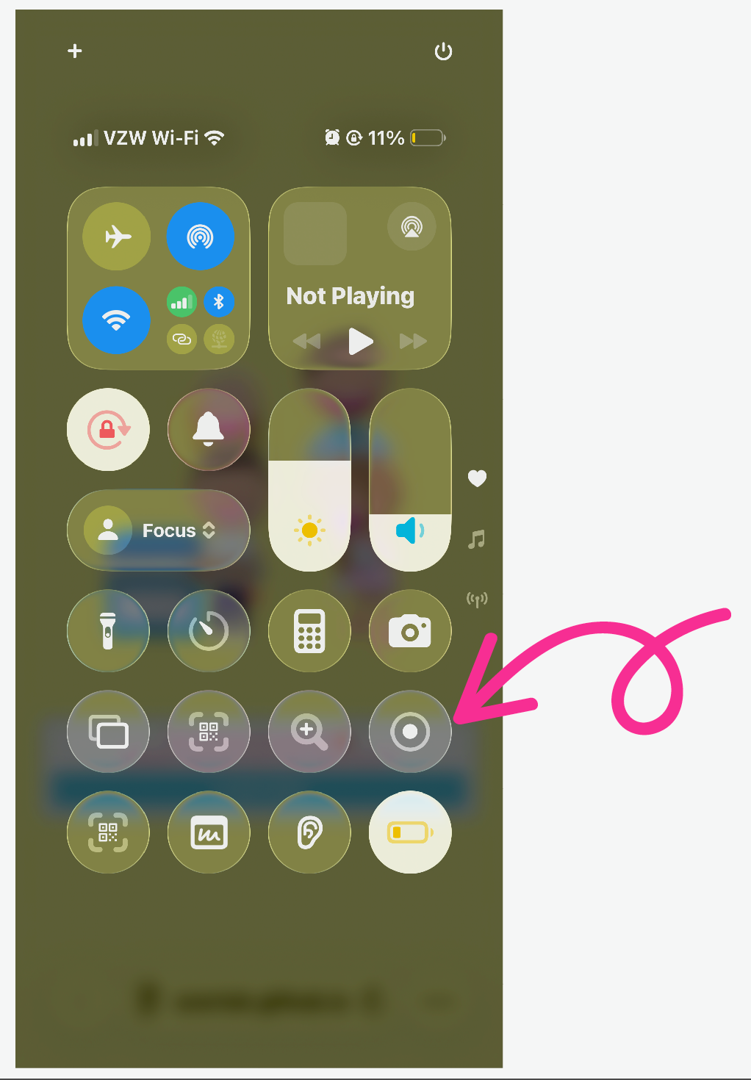
Tap Customize Controls (if needed) and add Screen Recording to the Control Center.
Swipe down from the top-right corner of the screen to open Control Center.
Tap the Screen Recording button (circle icon) and wait for the 3-second countdown to start recording.
To include audio, press and hold the Screen Recording button, tap Microphone, and then tap Start Recording.
To stop recording, tap the red status bar at the top of the screen and select Stop.
Your recording will be saved in the Photos app under Screen Recordings.
On Android 11 and Later
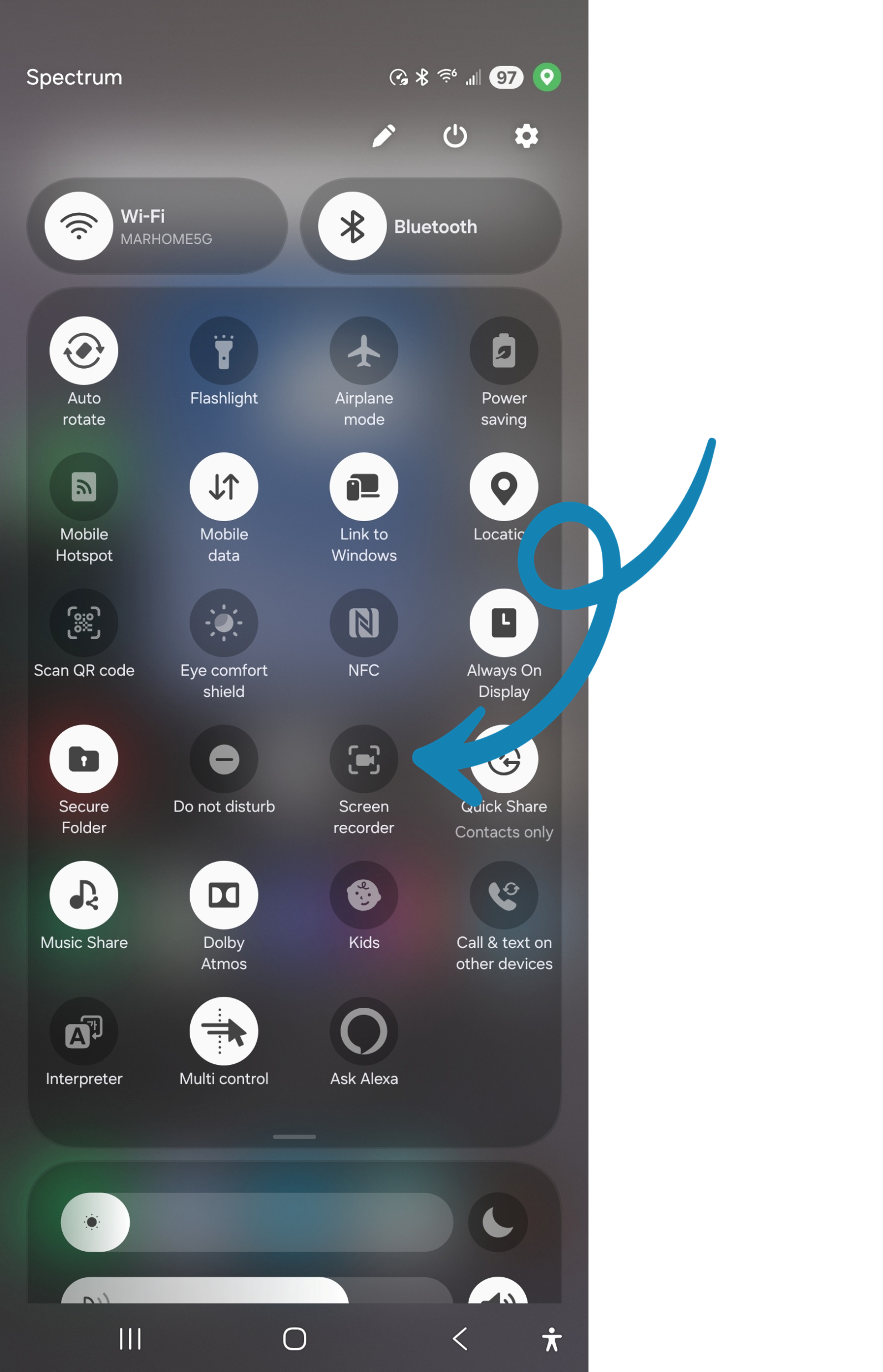
Swipe down twice from the top of your screen to open the Quick Settings panel.
Look for the Screen Record option. If it's not visible: Tap the Edit icon (pencil) and drag Screen Record into the Quick Settings panel.
Tap Screen Record.
Choose your recording preferences: Enable or disable audio recording (device audio, microphone, or both). Enable or disable showing touches on the screen.
Tap Start to begin recording. A countdown will appear before recording starts.
To stop recording, swipe down from the top of the screen and tap the Screen Recorder notification.